Posts

Tag Print

Image
Attached is my tag print. As you can see, I experimented with many different colors for my print. In the middle, I layered a red, green, and blue brush on top of each other to create the effect I desired. I really like the graffiti design and did not know you could make detailed custom brushes in Photoshop. I look forward to adding this tag to all of my projects.

Logo

Image
My logo consists of a question mark and a music note. The logo is unique because the period at the bottom of the question mark has been replaced with a music note. This reflects me and my personality because I am very inquisitive and love asking questions. I also have a passion for music. I turn to music when stressed or overwhelmed. I believe that my logo reflects my personality effectively.

Gradient Mesh

Image
My gradient mesh is a simple apple. I was inspired not only by the pear we made in class, but an apple that I ate after class. Using shading tools on illustrator, I believe that I made convincing light and shadows on this apple. I think the gradient mesh tool on illustrator is very interesting and I will be using it in the future. 

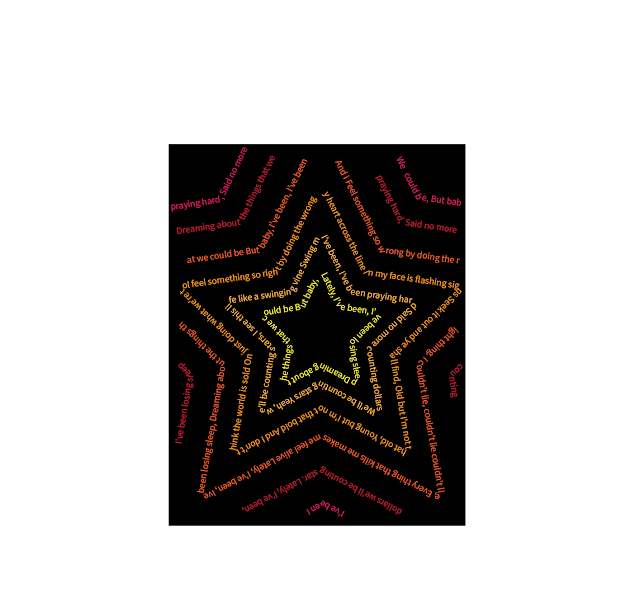
Calligrame

Image
For this project, I wrote the lyrics to OneRepublic's "Counting Stars" in the shape of overlapping stars. I was inspired by to use multiple colors to highlight the colors of hot stars. I created my own background by cutting off the points of the stars at the edges. I am very proud of my work and am excited to continue using Illustrator.

Canvas Project

Image
For my project, I decided to create an eye with a heart as the pupil. The background is a gradient that matches the eye color, with lines and rays of various colors. This project took me about 4 hours. The most time consuming portion of the project was adding the individual eyelashes. At first, it was very hard to find the exact location of where the eyelashes needed to be, but by the first few eyelashes I became familiar with placing lines at exact points. Another time-consuming portion of this project was adding the heart pupil. I had to get the coordinates right to fit in the eyeball. Overall, I learned a lot from this project. This was my first time using Dreamweaver and I am excited to learn more about the software and what I can create on it. This project was a good precursor to creating more complex designs and codes on the program. <!doctype html> <html> <head> <meta charset="UTF-8"> <title> FMX 210 DIGITAL MEDIA - CANVAS ...

HTML5 tutorials

https://youtu.be/LQPKzf_G18Q This tutorial provided examples on simple shapes in HTML5. The instructor adjusted shapes using code. https://youtu.be/yq2au9EfeRQ This tutorial showed movement in HTML5. I found it interesting that you can 'animate' the canvas. https://youtu.be/9gTw2EDkaDQ This was the most fundamental tutorial. Its showed how to write text on an HTML5 canvas.

First feelings of class

I am Chris Young, a sophomore from Jacksonville, FL. I am an Advertisement/Public Relations major and I expect to learn more about Adobe creative tools from this class. I hope to leave this class with a small portfolio of work, and am excited to learn, I have only slight experience working with Adobe Photoshop from about four years ago, and I know that the software updates often so it might be outdated. I think that this class is relevant because graphic design is a large part of advertising. Creating logos and business cards are an important part of representing a brand, and this is why this class is necessary for Advertising/Public Relations majors.